

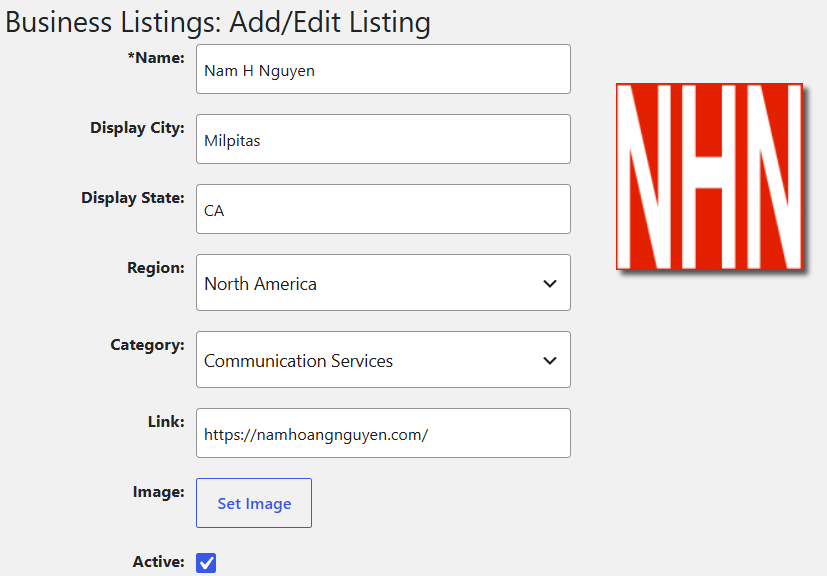
Free Global Business Listings allow companies to publish their business information on online directories at no cost. These listings help increase visibility, improve SEO, and make it easier for customers to find and contact the business. Each listing typically includes essential business details such as Name, Display City, Display State, Region, Category, and a Link (URL) to the company website.
📝 Instructions for Creating Free Global Business Listings
Below is a simple workflow you can use in MS Word or PowerPoint to organize and prepare listings before submitting them to online directories.
1. Create a Listing Template
Use the following fields:
- Business or your full Name — Official name of the business
- Display City — City where the business is located
- Display State — State or province
- Region — Country or geographic region
- Category — Type of business (e.g., Restaurant, IT Services, Retail)
- Link (URL) — Website or landing page
- Image or Picture – Your business logo or your own picture
2. Format in MS Word
Create a table with six columns:
- Name
- City
- State
- Region
- Category
- URL
- Image or Picture
Fill in each row for every business you want to list.
3. Format in PowerPoint
Create a slide layout:
- Title: Free Global Business Listings
- Body: Insert a table or bullet list with the same fields:
- Business Name
- Display City
- Display State
- Region
- Category
- URL
- Image or Picture
4. Submit to Free Global Directories
I can feature your business in the Global Business Listings section on namhoangnguyen.com. You’re welcome to connect with me on LinkedIn and send the necessary details there. Please do not include any personal information.